Stripe Smart Retries Explained: What They Cover and What They Miss
How Stripe's Smart Retries use machine learning to recover ~57% of failed payments, and the gaps they leave that cost SaaS businesses revenue.
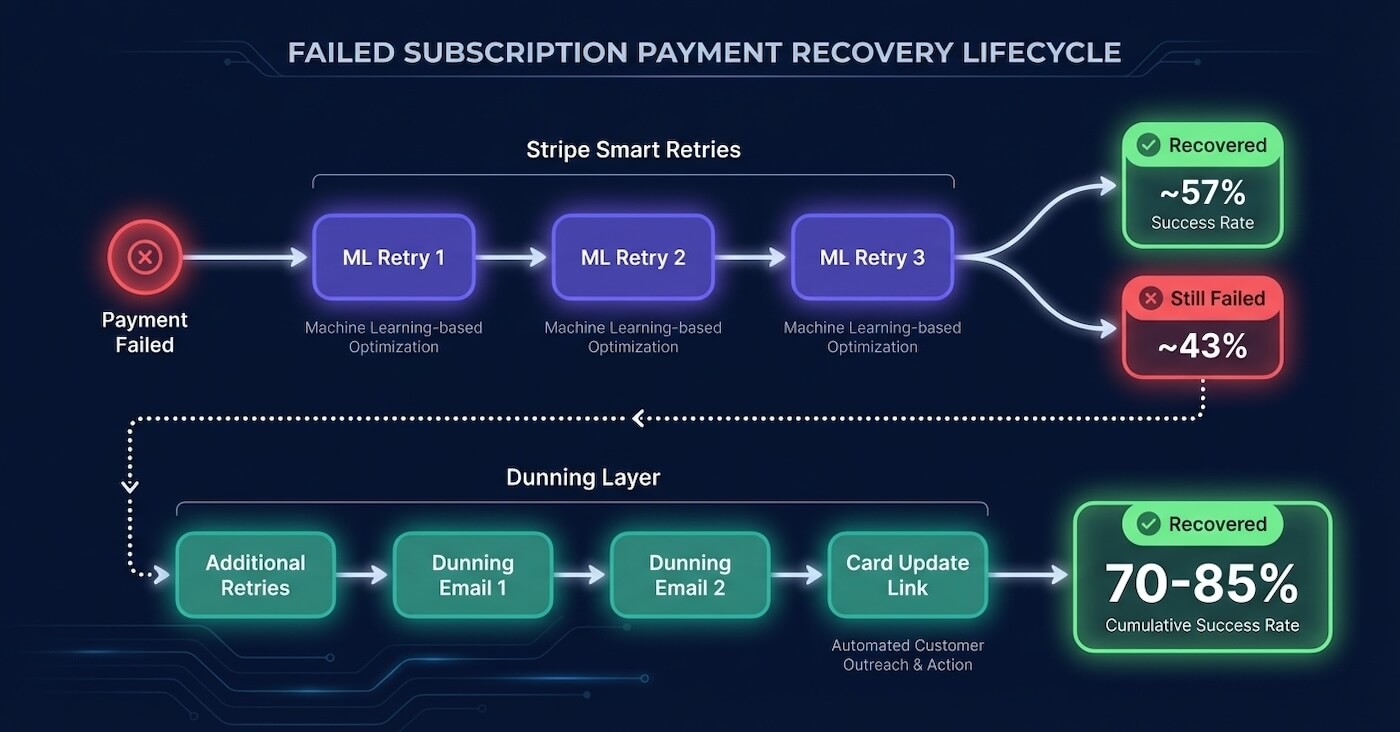
Stripe’s Smart Retries recover approximately 57% of failed recurring payments. For a feature that requires zero configuration and runs silently in the background, that’s impressive. But if you run a SaaS business on Stripe Billing, that number should also make you uncomfortable, because it means 43% of your failed payments aren’t coming back through retries alone.
We’ve spent a lot of time digging into how Smart Retries actually work under the hood. What the ML model uses as inputs, the exact Dashboard settings most people never touch, the hard decline gating behaviour that quietly prevents penalty fees, and the five gaps that no amount of retry optimisation can close. Most of what follows comes directly from Stripe’s own docs and their January 2024 engineering blog post, cross-referenced with published recovery data from Recurly, Churn Buster, and Churnkey.
What Stripe Smart Retries actually do
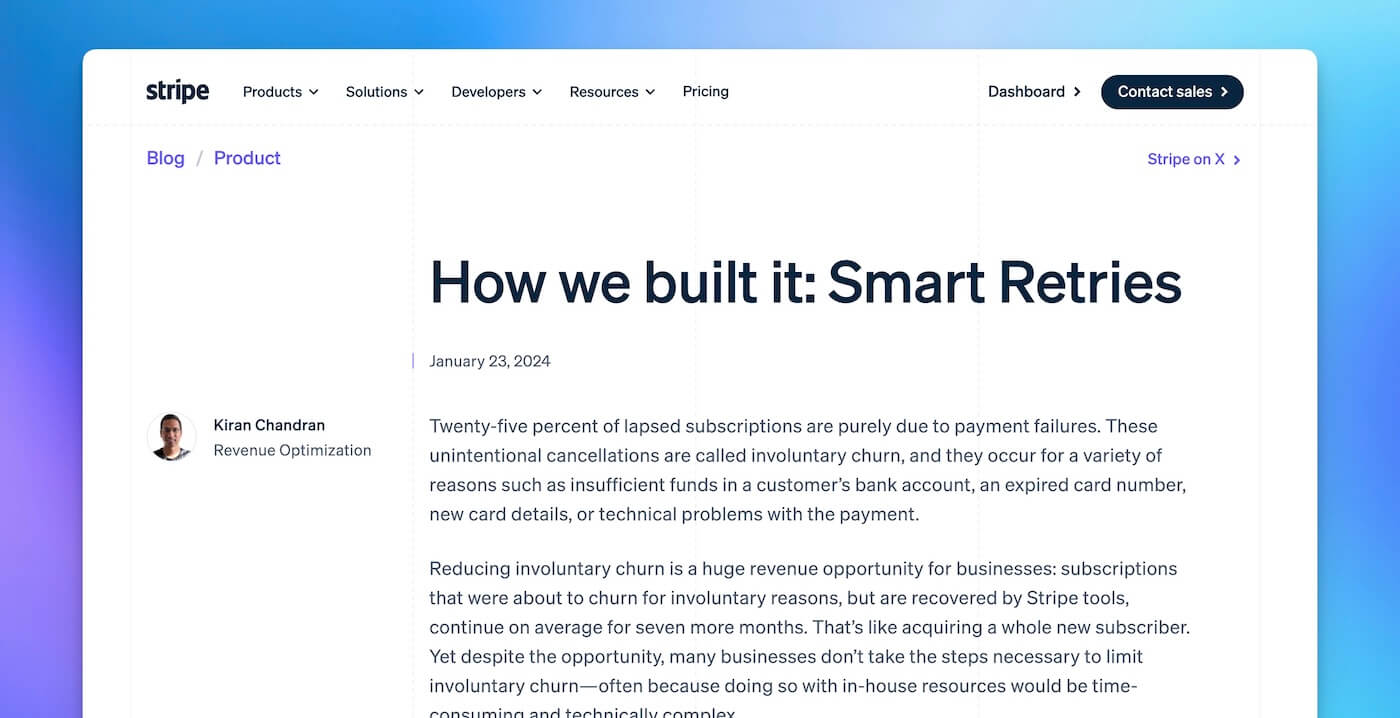
Smart Retries is part of Stripe’s Revenue Recovery suite, and it does one thing well: it uses machine learning to decide when to retry a failed payment instead of following a fixed schedule. The model trains on billions of data points from across Stripe’s entire merchant network. Not just your transactions. Every Stripe business’s payment data feeds the model.
Stripe’s engineering team published a detailed breakdown of how this works in January 2024. The model ingests over 500 attributes, organised into five categories:
Customer attributes cover geographic location, payment behaviour patterns, and the success rate of a given customer’s transactions across all Stripe businesses. If your customer’s card fails on your platform but succeeds at three other merchants that same day, the model knows the card is probably fine and the failure was timing-related.
Payment attributes include historical success and failure patterns for the specific card, plus real-time signals like the decline code and issuer message. Business attributes capture your industry, currency, and geography, because optimal retry timing varies depending on whether you and your customer are in the same region. Seasonality attributes combine time of day, day of week, and month of year with geographic data. And billing attributes factor in your product mix and historical retry outcomes.
One signal stands out: debit cards in certain countries succeed slightly more often at 12:01 AM local time. That’s almost certainly aligned with payroll deposit schedules. Another signal tracks how many different devices have presented a given payment method in the last few hours. The model is looking for patterns you’d never spot manually.
The results are solid but they have a ceiling. Stripe reports that businesses using Smart Retries recover 9% more revenue than those on fixed retry schedules, and that recovered subscriptions continue for an average of seven additional months. Across all of Stripe’s recovery tools combined (Smart Retries plus card account updater plus emails), Stripe claims $9.39 recovered for every $1 spent on Billing and $6.5 billion recovered for merchants in 2024.
That combined figure is important context. It includes everything, not just Smart Retries in isolation.
The retry mechanics most merchants never configure
Smart Retries supports up to 8 retry attempts within a configurable window: 1 week, 2 weeks, 3 weeks, 1 month, or 2 months. Stripe recommends 8 retries within 2 weeks as the default. The specific timing of each retry within that window is entirely determined by the ML model. You control the count and the outer boundary. The model controls everything in between.
The alternative is a custom retry schedule, which replaces Smart Retries entirely with fixed intervals. Custom schedules support up to 3 retries on Stripe Billing’s base tier or up to 8 on Billing Scale, spaced at 1, 3, 5, or 7 days between attempts. You get one or the other. ML-optimised timing or fixed intervals. Not a hybrid.
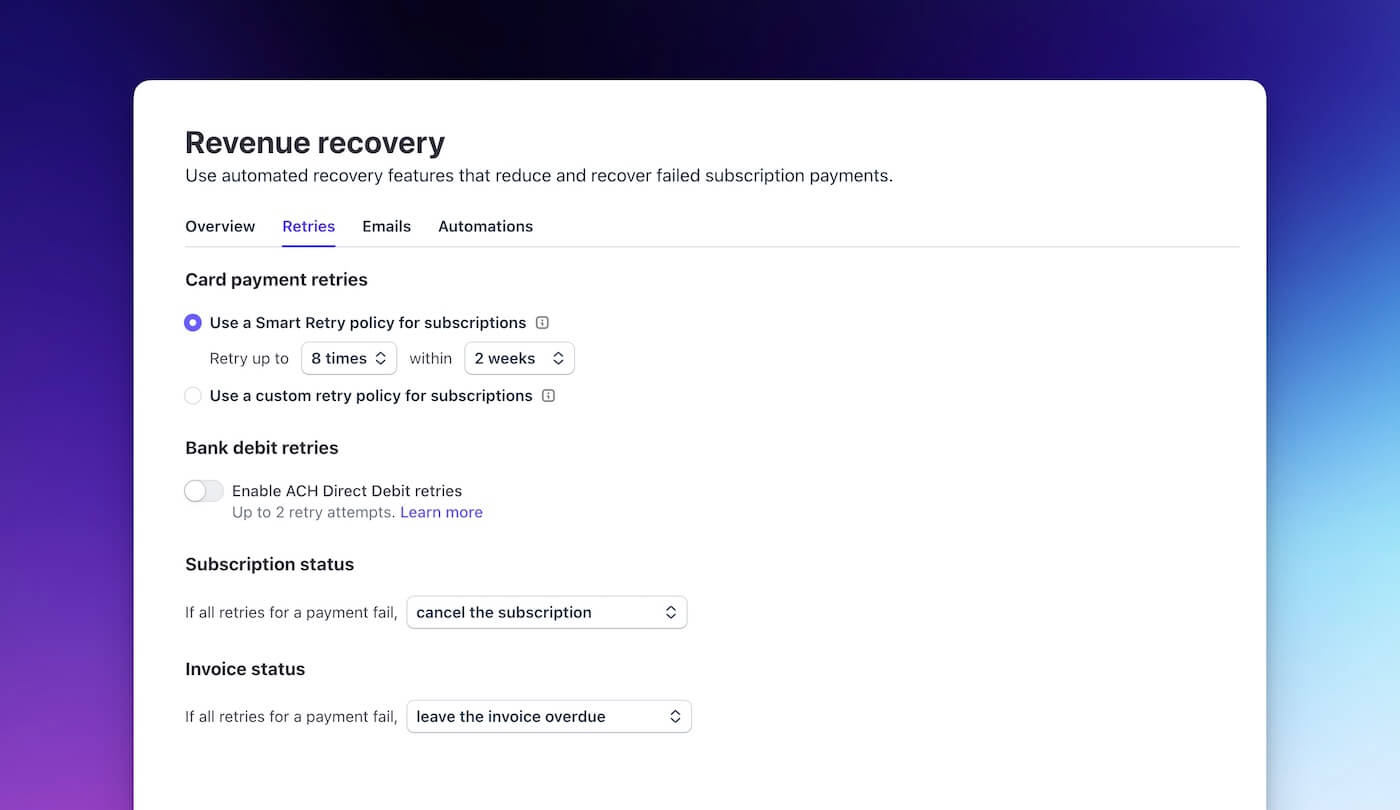
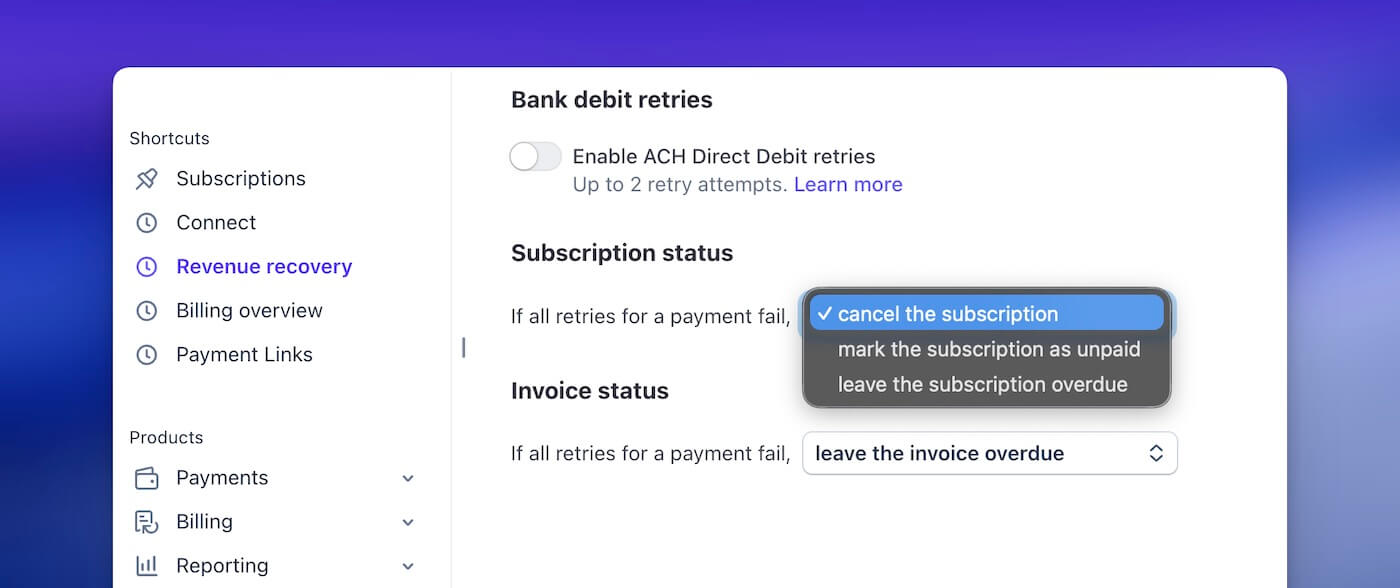
The full set of configurable options lives at Billing → Revenue Recovery → Retries in your Dashboard:
You can enable or disable Smart Retries entirely, set the number of retries to 4 or 8, choose the maximum retry window, and configure the post-exhaustion action (cancel the subscription, mark it unpaid, or leave it past_due). There’s also an escalation action after 30, 60, or 90 days past due, a toggle for Direct Debit retries (off by default for most methods), and a toggle for automated customer emails on failed payments.
That last one matters. It’s off by default.
There’s one behaviour here that catches people out: the payment method priority chain. Stripe follows a strict order when deciding which card to retry: subscription.default_payment_method → subscription.default_source → customer.invoice_settings.default_payment_method → customer.default_source. If your customer updates their card at the customer level but the subscription has its own default_payment_method set, Stripe keeps retrying against the subscription’s (possibly expired) card. We’ve seen this trip up more than a few teams.
How Smart Retries handle hard declines
Here’s something most Stripe merchants don’t know. When a card issuer returns a hard decline code, Smart Retries continues to schedule retries and increment the attempt_count, but the actual charge only executes if Stripe detects a new payment method on file. Unexecuted retries don’t create a Charge object.
The nine non-retryable codes are: incorrect_number, lost_card, pickup_card, stolen_card, revocation_of_authorization, revocation_of_all_authorizations, authentication_required, highest_risk_level, and transaction_not_allowed.
This is clever engineering. It means Stripe avoids Visa Category 1 penalty fees ($0.10 domestic, $0.15 cross-border per attempt) while still keeping the subscription in a retryable state. If the customer adds a new card, the next scheduled retry actually executes against the new card. But it also means the attempt_count on your invoice doesn’t tell you how many charges were actually attempted. It tells you how many were scheduled.
What Smart Retries don’t cover
Smart Retries is a silent, ML-optimised retry engine. That’s all it is. And Stripe is upfront about the boundaries. The adjacent recovery capabilities you’d expect to find are either separate products, turned off by default, or not available at all.
No dunning emails by default
This is the biggest gap. When Smart Retries fail, your customer has no idea their payment didn’t go through. Their subscription quietly degrades from active to past_due to cancelled, and they only find out when they lose access to your product.
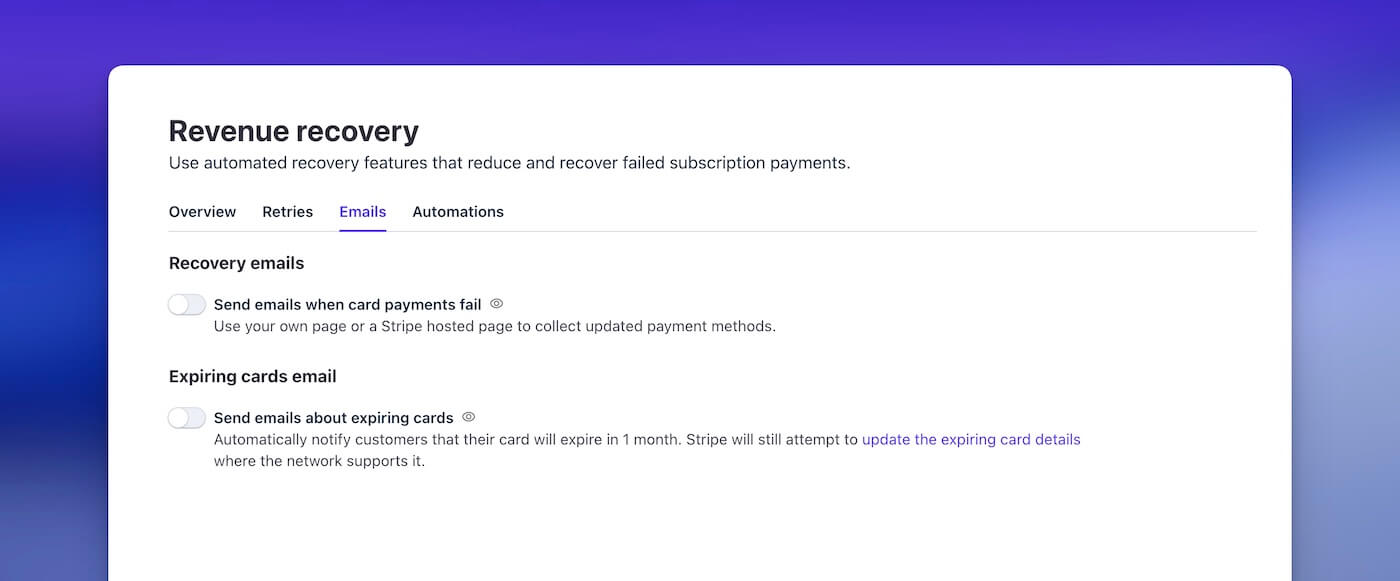
Stripe does offer basic email notifications for failed payments, but they must be explicitly enabled at Settings → Billing → Subscriptions and Emails. Even when turned on, you get a single template. You can add your logo and brand colour, but you can’t vary the message based on which retry attempt just failed, you can’t offer a discount or pause to save the subscription, you can’t send SMS, and you can’t build a multi-step sequence that escalates urgency over time. Every customer gets the same email whether it’s their first soft decline or their fourth failed attempt on an expired card. Churnkey has noted that the deep links in these emails don’t consistently direct customers to the card updater page, something even companies like Vercel and GitHub have reportedly experienced.
In practice, the gap between “Stripe can send a basic failed payment email” and “a proper dunning sequence that recovers revenue” is enormous. A well-built dunning flow sends different messages at different stages, links directly to a branded card update page, and stops automatically when the payment succeeds. Stripe’s native emails don’t do any of that.
No card update flow
If the card on file is expired, reissued with a new number, or the account is closed, retrying the same card number achieves nothing. The customer needs to provide a new card. Smart Retries has no mechanism to ask them.
Stripe’s Card Account Updater (CAU) catches some of this by communicating with card networks to get updated numbers for reissued cards. But it only works when the issuer participates in the network’s updater programme and the card was reissued (not closed). It costs $0.25 per card update, it’s not bundled with Billing, and it does nothing for the cases where you actually need the customer to enter a new card: account closures, bank switches, virtual card expirations, or cards where the customer opted out of automatic updates. For those, you need a dunning email with a direct link to a card update page.
No pre-expiry alerts, no schedule control
Say a customer’s card expires next month. You know the expiry date. You could email them now, before the payment fails, and avoid the whole retry cycle entirely. Stripe does offer a single card expiry email sent 30 days out, but it’s one email, one chance, no follow-up. It’s not connected to the retry system. Smart Retries only deals with the aftermath.
The retry timing itself is also a black box. You set the count and the window. The model decides when each attempt happens. The next_payment_attempt timestamp on the invoice tells you when the next retry is scheduled, but you can’t influence it. For most businesses, the ML timing does outperform fixed schedules for silent recovery. But if you want to coordinate retries with dunning emails (retry first, then email if it fails, then retry again after the email), or time retries around known payroll dates for B2C products, you can’t do that with Smart Retries.
Limited analytics by decline code
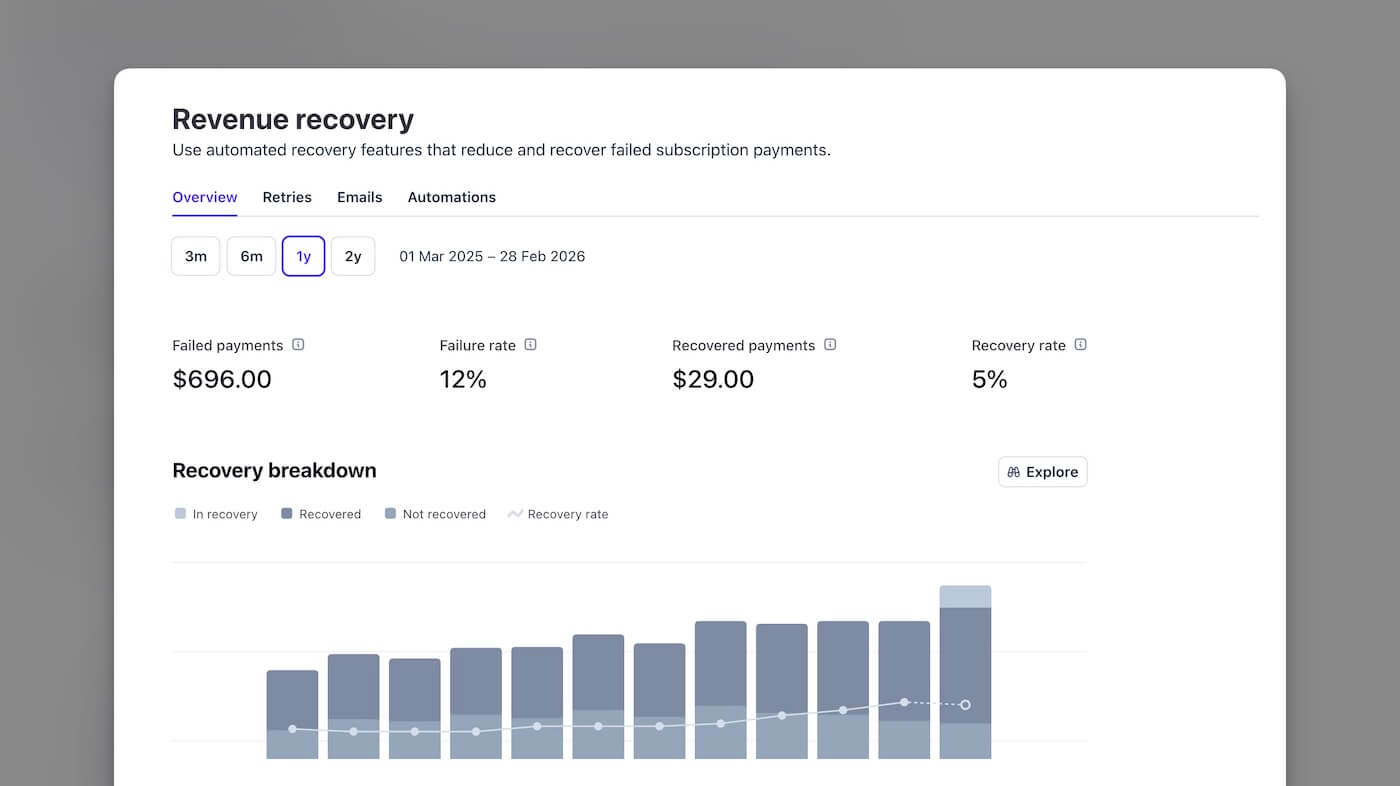
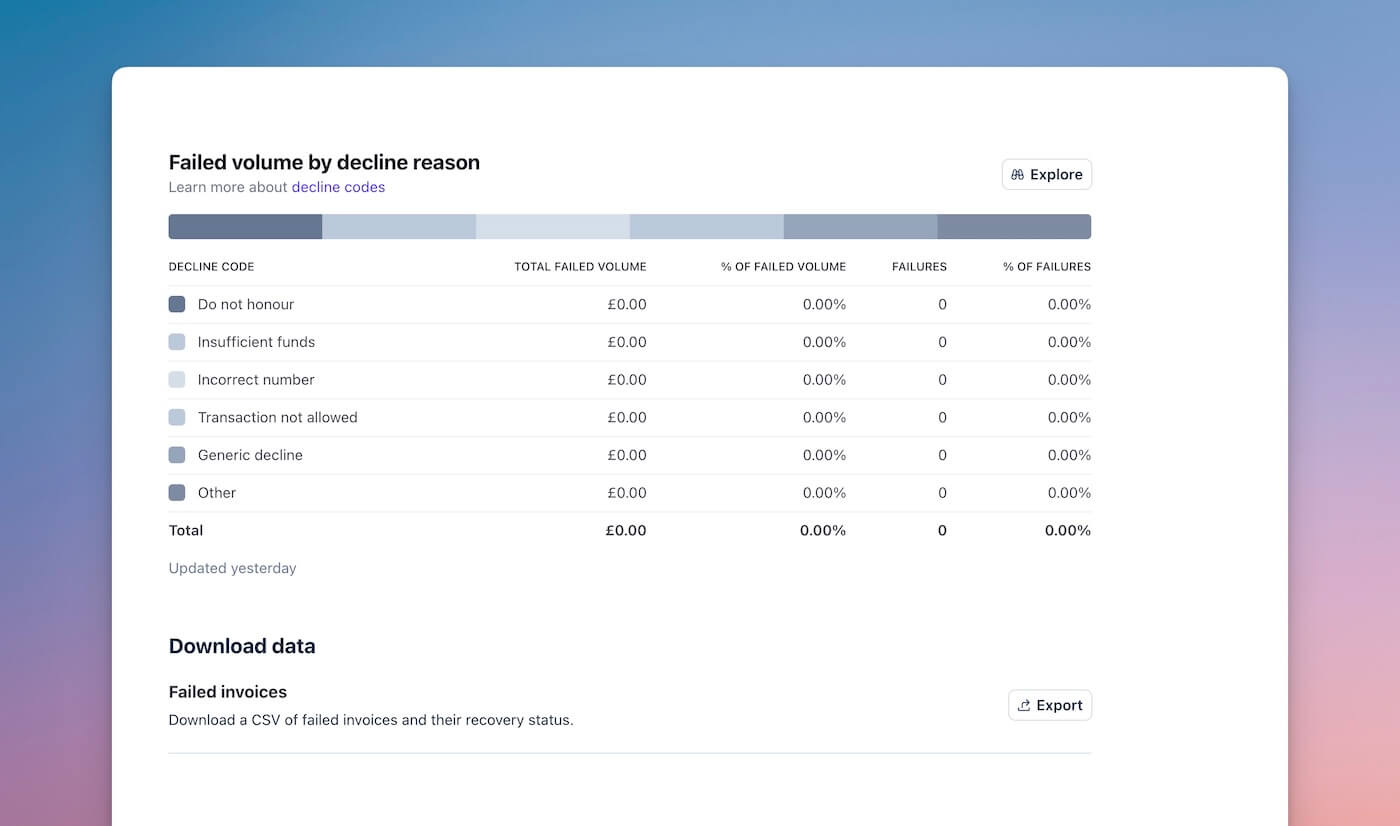
Here’s what you can see in Stripe’s Revenue Recovery dashboard: total failed payments, failure rate, recovery rate, and recovery volume broken down by method (retries, emails, other). You also get the top 5 decline codes by failure volume. What you can’t see is recovery rate per decline code. Your specific recovery rate for insufficient_funds versus expired_card versus generic_decline requires Stripe Sigma, their SQL-based reporting tool. That costs extra.
Why does this matter? For a bootstrapped SaaS founder, knowing your overall recovery rate is 57% is useful. Knowing your recovery rate for insufficient_funds is 73% but your recovery rate for expired_card is 4% is actionable. One tells you retries are working. The other tells you which failures need a completely different strategy.
When retries alone aren’t enough
The distinction between soft declines and hard declines is what limits any retry-only strategy. Across processors, the data is consistent: soft declines make up 80 to 90% of all card-not-present failures. Hard declines are the remaining 10 to 20%.
Soft declines are temporary failures. Insufficient funds, processor outages, fraud flags that clear on the next attempt. The card itself is fine. Smart Retries is built for exactly these, and the ML model is good at finding the right moment to try again.
Hard declines are a different problem entirely. Expired card, closed account, stolen card. Retrying a dead card four more times won’t bring it back to life.
Recurly’s data across 1,400+ subscription sites confirms the split. Four of the top five decline reasons (generic decline, insufficient funds, call issuer, and temporary hold) are all soft declines. Only “invalid card number” in the top five qualifies as hard. The single most common decline reason is insufficient_funds, accounting for over 40% of all online transaction declines.
The card network limits you need to know
Both Visa and Mastercard impose strict limits on how many times you can retry a declined payment, with escalating penalty fees for violations.
Visa classifies decline codes into four categories. Category 1 (“Issuer Will Never Approve”) includes codes like lost card, stolen card, and closed account. Any retry on a Category 1 decline incurs an immediate fee of $0.10 domestic or $0.15 cross-border. Categories 2 through 4 (temporary failures, data issues, and generic responses including the common “Do Not Honor” code 05) allow up to 15 reattempts within a rolling 30-day period before fees apply.
Mastercard’s Transaction Processing Excellence (TPE) programme sets tighter limits: a maximum of 10 declined attempts on the same card at the same merchant within 24 hours, and 35 attempts within 30 days. Penalty fees have escalated aggressively, from $0.15 per transaction in November 2023 to $0.50 per transaction as of January 2025. Mastercard also issues Merchant Advice Codes (MACs), with MAC 03 (“do not retry, fraudulent”) and MAC 21 (“do not retry, lost/stolen”) carrying penalties if retried.
Stripe’s recommended maximum of 8 retries sits comfortably within both networks’ limits. And the hard-decline gating behaviour described earlier, where scheduled retries only execute when a new payment method appears, elegantly avoids Category 1 penalty fees. Stripe has built responsible retry behaviour into the system. The question is what happens to the payments that retries can’t recover.
Building a complete recovery stack on Stripe
Stripe handles the silent retry layer well. The ML model, the network-level training data, the hard-decline gating. For what it does, Smart Retries is a good product. The gap is everything around it.
Silent retries are the foundation: recovering soft declines where the card is valid but the timing was wrong. Smart Retries handles this. For SaaS businesses that want additional retry attempts beyond what Stripe runs natively, ChurnWard’s retry logic complements Stripe’s built-in retries by running extra attempts on our own fixed schedule alongside Stripe’s ML-optimised ones. More total attempts means more chances for a soft decline to resolve.
But retries alone can’t recover payments where the customer needs to do something. That’s where customer-facing dunning comes in. Emails telling the customer their payment failed, with a direct link to update their card. Not a generic “there was a problem” message. Specific, branded communication that names the issue and gives them a one-click path to fix it.
Then there’s the part most businesses neglect entirely: preventing failures before they happen. Card expiry alerts sent 30 days out, prompting the customer to update proactively. Account Updater queries run before billing cycles to catch reissued cards. These stop the failure from ever reaching the retry system in the first place, and they barely exist natively in Stripe. Smart Retries covers silent recovery well. Stripe’s native emails offer a minimal version of customer-facing dunning, but without sequencing, segmentation, or reliable card update links, they’re a starting point at best. Pre-failure prevention is the gap that dedicated dunning tools fill.
What recovery rates actually look like
How much revenue are we actually talking about? The numbers vary by provider and how each one attributes recovery, so take any single figure with appropriate scepticism. But the direction is consistent.
Stripe’s own billing features page puts Smart Retries at approximately 57% of failed recurring payments recovered. That $9.39 per $1 spent figure you’ll see on Stripe’s marketing pages encompasses all recovery tools together (Smart Retries plus Card Account Updater plus emails), not Smart Retries in isolation.
Churn Buster’s published data offers the clearest decomposition of what each layer actually contributes. Their benchmark shows an average customer-level recovery rate of 50.3%, with two-thirds of accounts falling between 31.7% and 69.0%. Here’s the critical insight: 21% of failed payments recover through retries before the first dunning email is even sent (within 3 to 5 days), and retries on the existing card account for roughly 50% of all recovery. B2B SaaS companies with low voluntary churn should expect over 70% recovery with optimised dunning, with top performers reaching 80 to 90%.
Recurly and Churnkey’s numbers reinforce the pattern from larger datasets. Recurly’s decline management efficiency across 1,400+ subscription sites runs at 69.4% overall and 75% for B2B, with recovered subscriptions extending by a median of 141 days. One stat that sticks: 38% of a subscriber’s total lifetime occurred after a recovery event. Recovery isn’t just about saving one invoice. It’s about preserving months of future revenue. Churnkey’s 2025 State of Retention report (covering $3B+ in subscription revenue) recovered 70% of all involuntary churn detected. Dunning emails and SMS alone achieved 42%. That 28-point gap is the incremental value of retries layered on top of email-based dunning.
Every provider’s data points in the same direction. Retries alone get you into the mid-50s. Add a dunning layer and you’re in the 70 to 85% range. For a subscription business losing $79,000 monthly to payment failures (roughly 7.9% of $1M, per Spreedly’s aggregated data), that gap translates to $12,000 to $24,000 per month in additional recoverable revenue.
A caveat, though. Recovery rate attribution is messy across the industry. ProfitWell Retain (now Paddle Retain) claims a 77% recovery rate, but Churn Buster has documented that ProfitWell’s “Churned Delinquent” metric can under-report competitors’ performance by up to 42% due to campaign length mismatches. Take any single provider’s self-reported number with appropriate scepticism. The directional insight is what matters.
What this means for your Stripe setup
If you’re running a SaaS business on Stripe Billing, Smart Retries should be on. The ML model is trained on more transaction data than you’ll ever have access to, and the hard-decline gating prevents penalty fees. It’s included in Stripe Billing at no extra charge. No reason not to use it.
But Smart Retries as your complete failed payment strategy? That’s leaving revenue on the table. The 43% of payments that don’t come back through retries aren’t failing because the timing was wrong. They’re failing because the card is dead, the account is closed, or the customer needs to do something that a silent retry can never prompt them to do.
The question isn’t whether Smart Retries work. They do. It’s what you’re doing about the payments they can’t reach.
Sources
Stripe Documentation and Engineering
- Stripe: How we built it: Smart Retries: Engineering blog post covering the 500+ attribute ML model, five attribute categories, and the latency-vs-accuracy tradeoff.
- Stripe: Automate payment retries (Smart Retries docs): Official documentation covering configuration options, retry counts, hard-decline gating behaviour, and the nine non-retryable decline codes.
- Stripe: Automatic collection: Invoice retry settings for one-off invoices, retry schedule options, and post-exhaustion actions.
- Stripe: Revenue recovery: Overview of Stripe’s recovery suite including Smart Retries, customer emails, and recovery analytics.
- Stripe: Recovery analytics: Dashboard metrics available for recovery rate tracking, including the top 5 decline codes view.
- Stripe: Automate customer emails: Failed payment email configuration, branding options, and the separate enable toggle.
- Stripe: Billing features: Marketing page citing the 57% recovery rate and $9.39 per $1 spent figure.
- Stripe: Card declines: Decline code reference including
card_declinederror structure anddecline_codevalues.
Card Network Retry Rules and Penalties
- Checkout.com: Visa Response Code Categories: Visa Category 1 through 4 classifications, retry limits, and penalty fee structures.
- Qualpay: Visa’s Decline Code Grouping: Visa decline categories with code assignments.
- Nets: Visa Fines on Declined Transaction Reattempts: Visa penalty fee details for Category 1 violations.
- Congrify: Card Scheme Penalty Fees: Mastercard TPE fee escalation timeline from $0.15 (November 2023) to $0.50 (January 2025).
- Braintree: Mastercard Network Updates: Mastercard retry limits, MAC codes, and the Credential Continuity Programme.
Recovery Benchmarks
- Churn Buster: Recovery Rate (Learn Passive Churn): Recovery rate benchmark of 50.3% average, top performer at 94.5%, and factors affecting recovery performance.
- Churn Buster: Campaign Optimisation: B2B SaaS recovery expectations and guidance on measuring recovery rate accurately.
- Recurly: Subscriber Retention Benchmarks: Decline management efficiency of 69.4%, 75% for B2B, and 53.5% SaaS invoice recovery.
- Recurly: 2024 State of Subscriptions Report: 72% at-risk subscriber save rate, 141-day median post-recovery lifetime, 38% of lifetime occurring after recovery.
- Churnkey: State of Retention 2025: 70% involuntary churn recovery, 42% email/SMS-only recovery rate, $3B+ in subscription revenue covered.
- Churnkey: Stripe Smart Retries FAQs: 20% additional recovery lift when layering Churnkey on top of Stripe Smart Retries, and deep link issues with Stripe’s native emails.
- Churnkey: Stripe Dunning Best Practices: Limitations of Stripe’s native email notifications.
Decline Data and Industry Benchmarks
- Recurly: Payment Decline Reasons: Top 5 decline reasons across 1,400+ subscription sites, soft vs hard decline distribution.
- EBANX: Credit Card Declines: Insufficient funds accounting for 40%+ of online declines.
- Spreedly: Soft and Hard Decline Rates: Average card-not-present failure rate of 7.9%, credit card vs debit card decline rate split.
- Stripe: Decline Codes Complete List: Full Stripe decline code reference with recommended actions.